An update makes busy PS5 parties easier to follow, provided you know where to find the new toggle.
Miguel Lagoa/Shutterstock
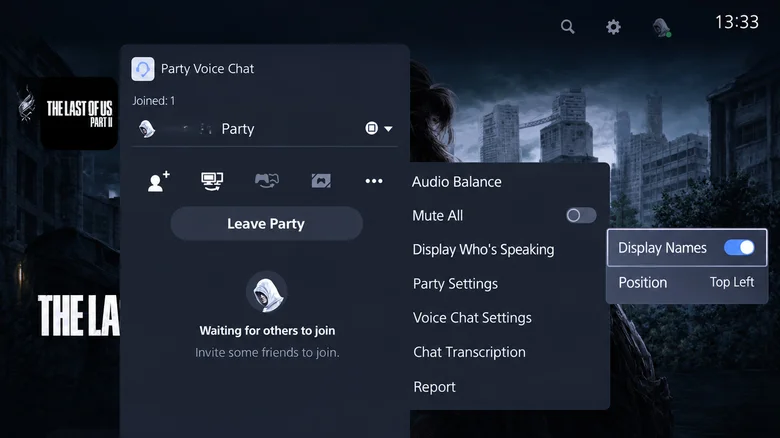
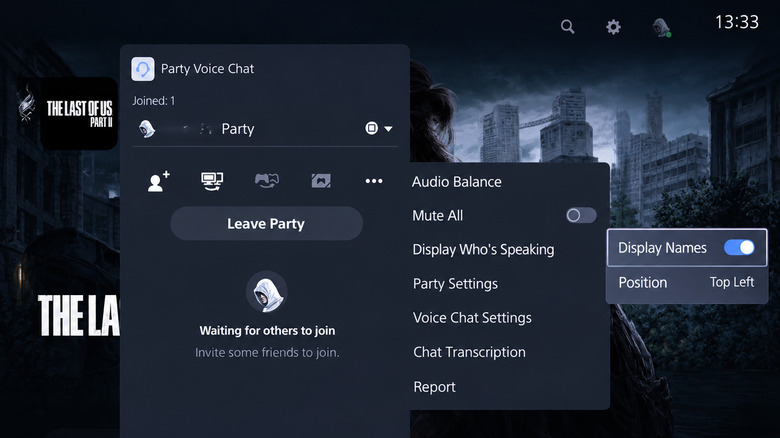
For years, figuring out who's speaking in a large PlayStation 5 party chat without opening the voice chat card has been a guessing game. Thankfully, the September 16, 2026 PS5 system software update (version 26.06-14.00.00) added an on-screen indicator to display the name of each player who's currently talking.
The September update also enabled enhanced PSSR upscaling by default on PS5 Pro , but the speaker indicator works on both the regular PS5 and PS5 Pro. You can also choose where it appears on-screen, though you'll have to turn it on first since it's not enabled by default. Also, if you used this option prior to September, you weren't imagining it!
How to use Display Who's Speaking on PS5
Husain Parvez for Engadget
First, you'll need to create or join a PlayStation party for voice chat. To make one, open Control Center by pressing the PS button.…